

Why Turnkey for Embedded WaaS?
Turnkey provides the infrastructure to embed wallets directly into your product without building or managing key management yourself. Every wallet runs inside Turnkey’s secure enclaves, giving your users hardware-backed key security with sub-100ms signing latency. The 2-of-2 root quorum model lets you enforce billing, compliance, and risk controls at the cryptographic layer, not just the application layer, while keeping your platform non-custodial by design.Core Principles
- Segregated environments per end user: Each end user gets a fully isolated environment containing their wallets, credentials, policies, and activity logs. User data and key material are segregated from other users and from your platform’s management layer.
- Configurable admin and billing controls: The recommended model requires both the end user and the platform to co-approve any funds-moving transaction. This gives you a cryptographic enforcement point for billing, compliance, and abuse prevention at the infrastructure layer, not just the application layer.
- Explicit user consent: End users authenticate via passkey or equivalent authenticator for every funds-moving action. No transaction executes without the user’s direct approval.
- Non-custodial by default: Your platform can block transactions but cannot move funds unilaterally. This keeps you non-custodial while retaining the service-level controls your business requires.
- Portable key ownership: A built-in key export mechanism ensures end users are never locked in. Users can export their wallet independently if the provider goes offline or they choose to leave the platform.
Architecture
The diagram below shows the recommended sub-org structure for a WaaS deployment using 2-of-2 root quorum signing.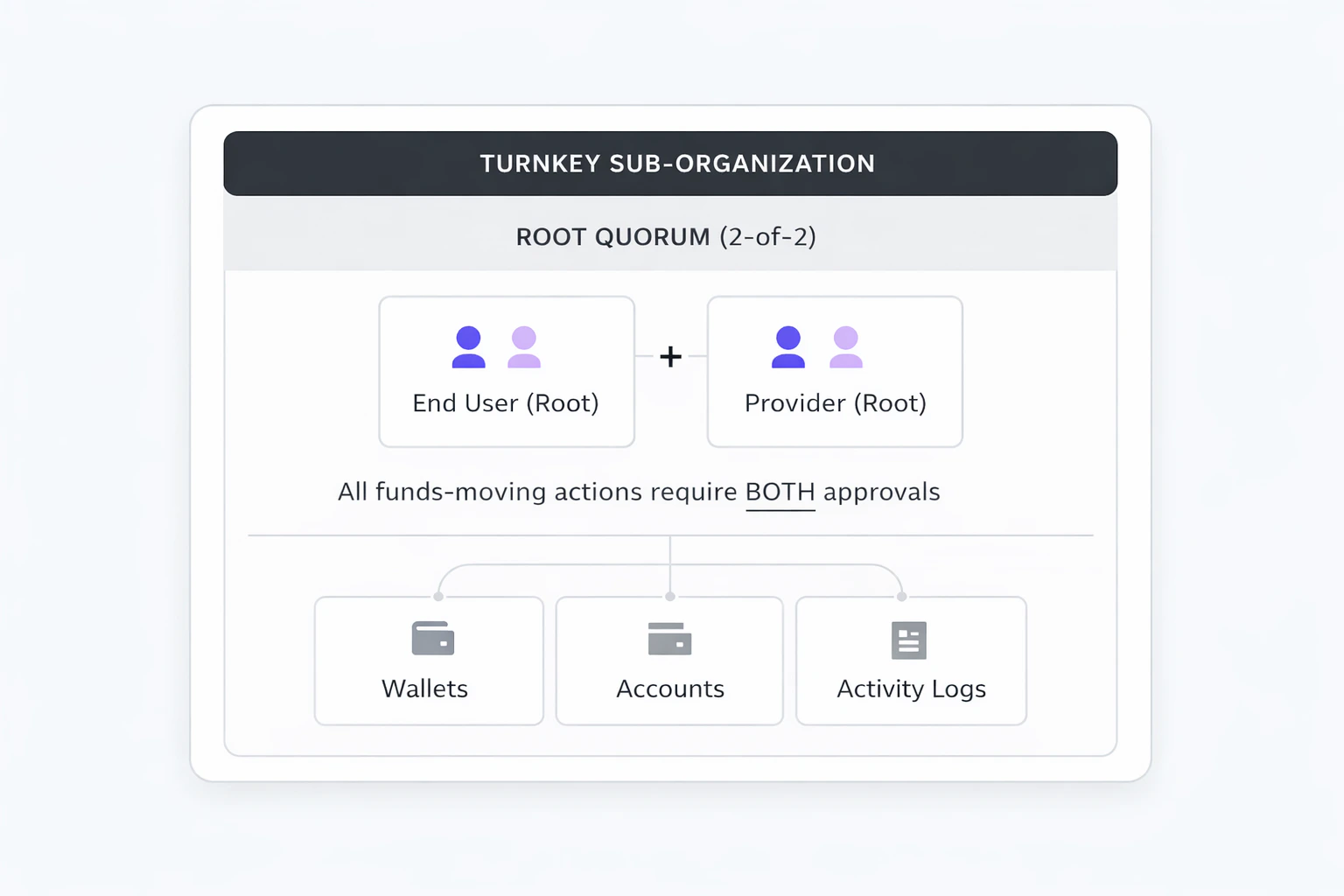
Transaction Authorization Flow
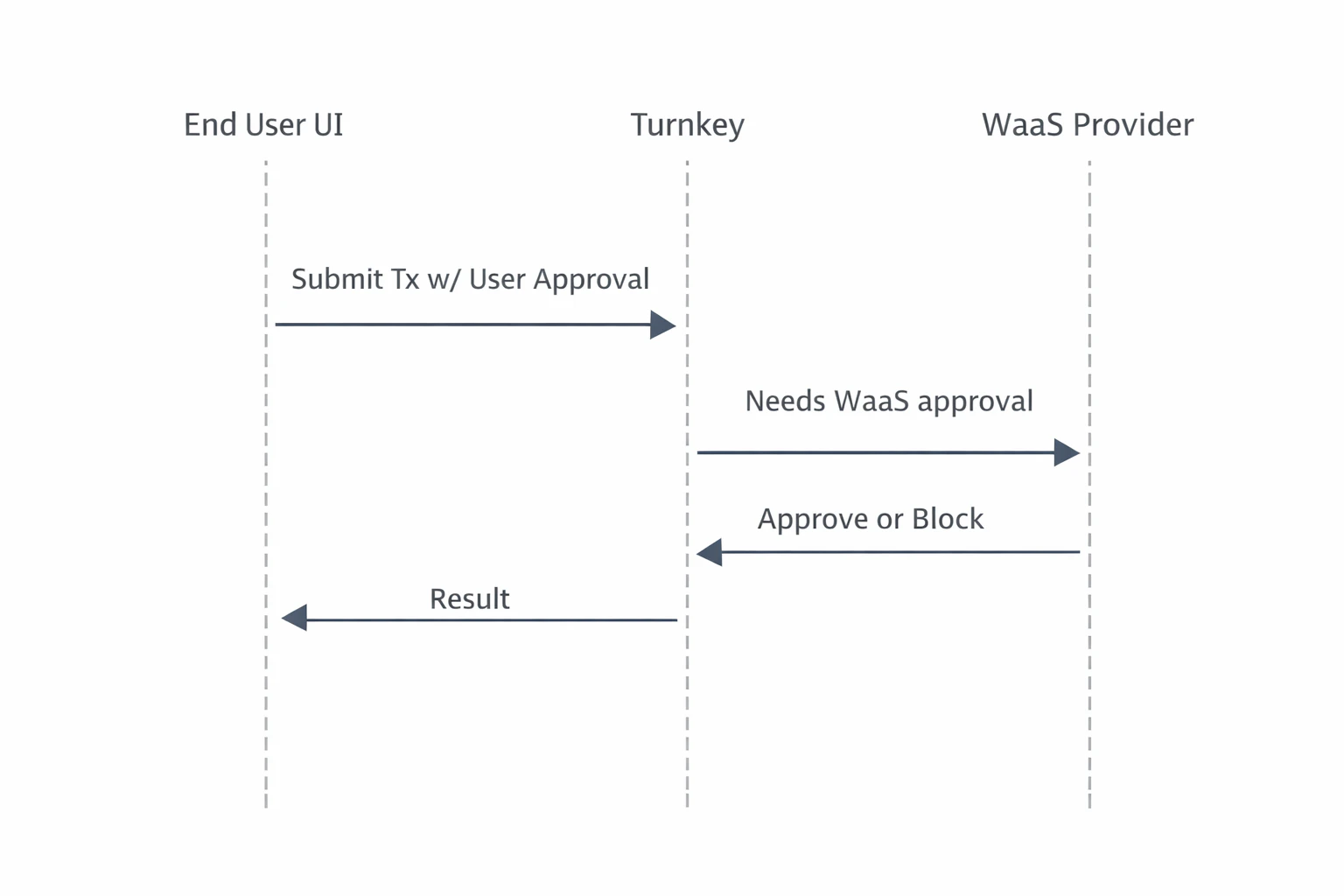
The sequence below describes the default funds-moving flow under the 2-of-2 root quorum model:- End user initiates a transaction from the embedded wallet UI.
- End user approves via their authenticator (e.g. passkey). Turnkey records the activity as partially approved.
- The WaaS provider evaluates on its own backend: billing status, risk/compliance rules, and any other checks.
- Provider approves via API key. The transaction executes.
- If the provider withholds approval, the transaction does not execute.
How to Get Started on Embedded WaaS with Turnkey
Step 1: Define the Tenant Model and Ownership Boundaries
Map your platform’s user model to Turnkey’s sub-organization primitive. The standard approach is one sub-org per end user.- Tenant isolation: Each sub-org is a self-contained data boundary. Wallets, users, authenticators, policies, and activity logs are fully isolated between sub-orgs.
- Parent-child relationship: Your parent organization has read-only access to sub-orgs and can initiate auth/recovery flows, but cannot sign transactions or modify policies within them.
- External mapping: Track the relationship between your platform’s user IDs and Turnkey sub-org IDs in your own database. Turnkey does not enforce or require a specific external ID scheme.
Choose Your Custody Model
Turnkey’s primitives are flexible enough to support a wide range of custody configurations. The three below are the most common paths for WaaS products:| Consideration | Co-managed (Recommended) | Self-custody | Fully Custodial |
|---|---|---|---|
| Transaction control | Both user and provider must approve. Cryptographic enforcement of billing, compliance, and risk controls. | User has full unilateral signing authority. Provider controls are application-layer only. | Provider signs on behalf of the user. Full operational control over wallets. |
| Custody classification | Non-custodial. Provider can block but not move funds alone. | Non-custodial. Provider has no signing authority. | Custodial. Provider holds signing authority and must manage regulatory obligations accordingly. |
| Setup complexity | Staged sub-org creation (create at 1-of-2, configure policies, raise to 2-of-2). | Single-step sub-org creation. No staged threshold changes. | Single-step. Provider is sole root user with full API key access. |
| Best fit | Most WaaS products needing billing gates, compliance holds, or service-level transaction approval. | Products emphasizing maximum user sovereignty where application-layer controls are sufficient. | Platforms managing wallets entirely on behalf of users (e.g. operational treasury, backend automation). |
Step 2: Design the Sub-Organization Control Model
Define what lives inside each sub-org and how control is shared between the platform and the end user.- End user (root): Authenticated via passkey or equivalent user-controlled authenticator.
- WaaS provider (root): Authenticated via API key. Used to approve or block transactions based on your service rules.
- Delegated Access (optional): If needed for automation or backend-initiated workflows, add a scoped non-root API key via Delegated Access. DA must be tightly policy-scoped and should never have broad signing authority or bypass user consent.
Step 3: Define Default Wallet and Policy Template
Specify what gets created in every sub-org by default: wallet structure, supported chains/accounts, and baseline policies.Staged Sub-Org Creation (Option A)
For the 2-of-2 quorum model, establish the threshold last so the backend can configure policies (including export) with only provider approval: 3a. Create sub-org with both root users at 1-of-2 threshold| Step | Action | Quorum State |
|---|---|---|
| 1 | Create sub-org with both root users + wallet | 1-of-2 |
| 2 | Create export policy for end user | 1-of-2 |
| 3 | Update threshold to 2 | 2-of-2 |
Step 4: Build the Developer-Facing SDK or Integration Surface
Create the SDK, APIs, or UI components that downstream developers integrate with. Abstract away Turnkey internals and expose only your platform’s intended wallet, auth, and signing flows.- Embedded Wallet Kit (EWK): Use and extend the Embedded Wallet Kit for user authentication, wallet UI, and approval prompts. Fork or wrap EWK components to match your branding and surface “pending provider approval” states.
- Backend service: Your backend is required to handle provider root approvals (via API key), billing and risk evaluation, and activity monitoring.
- SDK abstraction layer: Wrap Turnkey’s SDK calls behind your own interface so downstream integrators never interact with Turnkey directly. This gives you full control over the developer experience and allows you to swap or upgrade infrastructure without breaking integrations.
Step 5: Incorporate the Embedded Wallet into the Platform Flow
Wire the Turnkey-backed wallet into your application’s onboarding and runtime flows so every downstream integration inherits a working embedded wallet experience.- Onboarding: Handle Turnkey org setup, auth configuration, and the staged sub-org creation flow as part of your user registration. The end user should experience passkey registration (or equivalent) as a natural part of sign-up.
- Client initialization: Initialize the Turnkey client with the user’s sub-org context on each session. Use sessions for batched signing workflows to reduce authentication friction during active use.
- Transaction flow: Surface the approval prompt via EWK components, submit the user’s approval to Turnkey, run your backend checks, then co-sign or withhold.
- Recovery: Expose the export flow in your settings UI so users can self-serve wallet recovery. Turnkey’s enclave encrypts the mnemonic to a user-generated target key via HPKE. Neither Turnkey nor your platform can view the exported material.
Use Cases
| Need | Configuration |
|---|---|
| Fintech or neobank with card-linked crypto wallets | Co-managed with billing gates: Provider co-signs after verifying account standing. Export policy as user escape hatch. Passkey auth for consumer UX. |
| Dev tooling platform reselling embedded wallets | White-labeled EWK with SDK abstraction: Downstream developers integrate with your SDK, never touching Turnkey directly. Segregated environments per end user, provider co-sign for compliance. |
| Self-custody consumer wallet | Self-custody model: Maximum user sovereignty. Provider handles auth initiation and UX but has no signing authority. Application-layer controls for billing. |
| Institutional or high-value accounts | Co-managed with policy-based limits: Transaction-aware policies for amount thresholds, sanctioned address deny-lists, and chain restrictions. |
The Result: Non-Custodial Control at the Infrastructure Layer
Embedded WaaS with Turnkey gives your platform a cryptographic enforcement point for billing, compliance, and risk controls, without taking custody of user funds. The 2-of-2 root quorum model guarantees explicit user consent on every transaction while preserving provider-level service control. Users are never locked in: the export policy escape hatch ensures they can always recover their wallet independently. This architecture is easy to audit and reason about: nothing moves unless both the user and provider approve. Customers can evolve the model over time by introducing scoped Delegated Access, adding policy-based limits, or migrating high-throughput flows off root quorum as needs change.DIMO Case Study
DIMO is a decentralized transportation network connecting over 165,000 vehicles. Drivers share vehicle data to access apps for insurance, fleet management, and predictive maintenance. DIMO uses Turnkey to power its embedded wallet infrastructure, replacing a fragmented onboarding flow that required external wallet apps and seed phrases. With Turnkey, DIMO delivered:- Passkey-first onboarding: DIMO replaced seed phrases and external wallet installs with Turnkey’s passkey authentication, cutting sign-in time from 2 minutes to 10 seconds and boosting onboarding completion by 30%.
- Sub-org per user with full ownership: Each driver gets an independent sub-organization, giving them complete control of their credentials and transactions while DIMO retains the governance layer needed for enterprise compliance.
- On-chain transaction SDK: DIMO’s open-source transactions SDK uses Turnkey’s stamper and signer primitives directly, supporting vehicle registration, data permissions (SACD), staking, and device pairing, all backed by smart account sessions to minimize signature prompts.
- 2-3 week integration: Full deployment into DIMO’s global login stack completed in under three weeks using Turnkey’s SDKs and responsive support.
Resources
- Sub-organizations: Tenant isolation and user modeling
- Root quorum: Multi-party approval and ownership configuration
- Policy engine: Authorization rules, transaction controls, and export policies
- Embedded Wallet Kit: Prebuilt UI components for auth and wallet flows
- Export wallets: Key export and user recovery